
Last updated on
Oct 31, 2026

Online Form 3420 Contract of Mandate free printable template
We are not affiliated with any brand or entity on this form

Fill out
Complete the form online in a simple drag-and-drop editor.

eSign
Add your legally binding signature or send the form for signing.

Share
Share the form via a link, letting anyone fill it out from any device.

Export
Download, print, email, or move the form to your cloud storage.
Why pdfFiller is the best tool for your documents and forms


End-to-end document management
From editing and signing to collaboration and tracking, pdfFiller has everything you need to get your documents done quickly and efficiently.
Accessible from anywhere
pdfFiller is fully cloud-based. This means you can edit, sign, and share documents from anywhere using your computer, smartphone, or tablet.
Secure and compliant
pdfFiller lets you securely manage documents following global laws like ESIGN, CCPA, and GDPR. It's also HIPAA and SOC 2 compliant.
What is Online Form 3420 Contract of Mandate
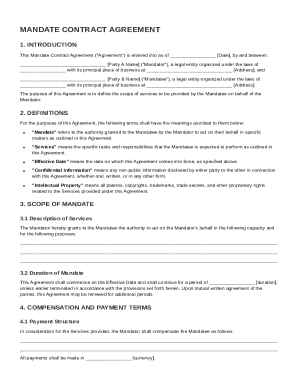
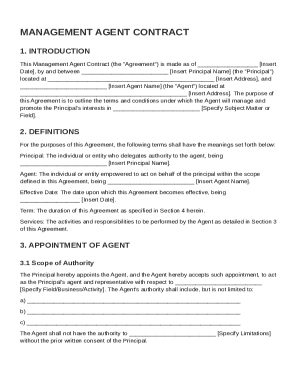
The Contract of Mandate is a legal document used by a Mandator to empower a Mandatary to act on their behalf in specific matters.
pdfFiller scores top ratings on review platforms




wish I'd known how to do this earlier, It was so easy and this was my first time
this worked well for what I needed to accomplish.
Who needs Online Form 3420 Contract of Mandate?
Explore how professionals across industries use pdfFiller.

Online Form 3420 Contract of Mandate is needed by:
-
Business owners seeking to delegate tasks
-
Consultants needing formal agreements
-
Freelancers requiring authorization for projects
-
Individuals hiring representatives for personal matters
-
Lawyers drafting agreements for clients
Comprehensive Guide to Online Form 3420 Contract of Mandate
What is the Contract of Mandate?
The Contract of Mandate is a legal agreement that defines the relationship between two parties: the Mandator and the Mandatary. The Mandator empowers the Mandatary to act on their behalf in specific matters, such as business transactions or personal affairs. This contract is particularly useful in situations that require clear delineation of responsibilities and expectations.
Understanding the roles of both parties is crucial. The Mandator is responsible for providing necessary details and authority, while the Mandatary must act with care, diligence, and honesty. Clarity in these responsibilities minimizes conflicts and ensures smooth execution of the assigned tasks.
Common scenarios where a Contract of Mandate might be used include delegating authority in property management, business transactions, or consulting roles. It is essential for the involved parties to understand their responsibilities fully to avoid misunderstandings.
Purpose and Benefits of the Contract of Mandate
The Contract of Mandate serves to protect both the Mandator and the Mandatary by providing a clear framework for their relationship. This written agreement safeguards the interests of both parties by outlining their respective duties, which helps in preventing disputes.
One significant advantage of having a written mandate is that it ensures flexibility. Agreements can be structured as compensated or gratuitous, depending on the expectations of both parties. This versatility allows for tailored arrangements based on specific needs, making it a preferred choice for many.
Additionally, possessing a formal contract enhances legal standing, making it easier to resolve any issues that may arise during the execution of assigned tasks.
Key Features of the Contract of Mandate
A well-drafted Contract of Mandate includes various essential features. It typically consists of fillable fields for entering critical information, such as the names of the Mandator and Mandatary, the specifics of the mandate, and compensation details, if applicable.
Moreover, the document incorporates signature lines for both parties, ensuring that both individuals acknowledge and agree to the terms. This agreement also addresses the inclusion of expenses, which helps clarify the financial obligations of the Mandator.
To enhance user experience, platforms like pdfFiller utilize advanced security features and compliance standards, ensuring the integrity and confidentiality of the agreement throughout its lifecycle.
Who Needs the Contract of Mandate?
The Contract of Mandate is beneficial for various individuals and businesses, particularly those in consultancy, freelancing, or agency roles. People who often require this agreement include consultants who manage projects for clients, freelancers handling specific assignments, and businesses delegating tasks to agents.
Potential scenarios necessitating this contract involve circumstances where one party needs to authorize another to act on their behalf, such as signing documents, making decisions, or managing finances. For professionals like consultants and freelancers, having a formalized agreement simplifies the working relationship and establishes clear expectations.
This contract is a practical solution for ensuring legal protection and clarity in professional collaborations, making its utilization widely applicable.
How to Fill Out the Contract of Mandate Online (Step-by-Step)
Completing the Contract of Mandate online is a straightforward process that can be effectively executed by following these steps:
-
Begin by gathering all necessary information, including the full names and addresses of the Mandator and Mandatary.
-
Access the online template through platforms like pdfFiller, where the form is readily available.
-
Fill in the required fields, ensuring accuracy in the details related to the mandate's purpose and any financial arrangements.
-
Review the completed document for any potential errors or omissions.
-
Proceed to sign the document digitally, ensuring both parties have fulfilled this requirement.
Common pitfalls to avoid include leaving fields blank, misrepresenting details, and not securing the signatures of both parties. Following the provided steps ensures a smooth completion of the agreement.
Review and Validation Checklist for the Contract of Mandate
Once the Contract of Mandate is filled out, it is crucial to validate its accuracy. Here are key areas to double-check:
-
Verify that both parties' names and contact details are correct.
-
Ensure that the specific purpose of the mandate is clearly defined.
-
Confirm that any required signatures are present and in the correct places.
-
Review any financial obligations or expense reimbursements outlined in the contract.
-
Keep a copy of the finalized agreement for your records and future reference.
Taking steps to review these elements can help secure the integrity and enforceability of the agreement.
How to Sign the Contract of Mandate – Digital vs. Wet Signature
Signing the Contract of Mandate can be accomplished through various methods. One efficient option is the use of digital eSigning features available via platforms like pdfFiller. This method offers convenience and speed, ensuring signatures can be acquired quickly.
In cases where a wet signature is preferred or required, it’s essential to establish a process for collecting these signatures. This may involve printing the document and arranging for both parties to sign in person.
It is important to note that digital signatures have legal validity in most jurisdictions, making them a reliable alternative to traditional signed documents.
Where to Submit the Contract of Mandate and Next Steps
After successfully completing and signing the Contract of Mandate, the next step involves submission. Depending on your jurisdiction and the specific context of the mandate, submission locations may vary.
Some typical submission options include filing with a relevant authority, sharing with involved parties, or retaining for your legal records. Additionally, tracking submission status may be necessary in certain cases, allowing you to confirm that all parties have received and acknowledged the contract.
Understanding these steps is crucial to ensure that the agreement is properly enacted and recognized.
Security and Compliance When Using the Contract of Mandate
Handling sensitive information in the Contract of Mandate is of utmost importance. Platforms like pdfFiller implement robust security measures, including 256-bit encryption and adherence to compliance standards such as SOC 2 Type II and HIPAA.
Ensuring data privacy is critical, and it is maintained throughout the document creation and storage process, providing peace of mind to users regarding the protection of their information.
These measures ensure that the handling of the Contract of Mandate maintains a high level of security and integrity.
Empowering Your Agreements with pdfFiller
Utilizing pdfFiller can significantly enhance your experience when creating and managing the Contract of Mandate. The platform is designed for user-friendliness, featuring capabilities for editing, eSigning, and seamless document sharing.
With pdfFiller, users have the opportunity to manage their agreements efficiently while ensuring their security and compliance needs are met. Start using pdfFiller today to simplify your process of filling out the Contract of Mandate and enjoy the myriad of features available.
How to fill out the Online Form 3420 Contract of Mandate
-
1.To access the Contract of Mandate, go to pdfFiller and use the search bar to locate the form.
-
2.Open the form by selecting it from the results and clicking on the 'Edit' button to begin filling it out.
-
3.Before completing the form, gather necessary information, such as the names and contact details of the Mandator and Mandatary, as well as the specific object and scope of the mandate.
-
4.As you navigate pdfFiller, use the toolbar to click on each blank field to enter information, such as names, details of the agreement, and compensation terms.
-
5.Be sure to read each section carefully and provide accurate information to avoid errors.
-
6.Use the signature lines provided for both the Mandator and Mandatary. You can add digital signatures easily within pdfFiller.
-
7.After filling out the form, review all entries for accuracy and completeness.
-
8.Once finalized, save your document by clicking the 'Save' button, or download a copy directly to your device for sharing or filing.
-
9.You may also choose to submit the completed agreement directly through pdfFiller's sharing options via email.

Who is eligible to use the Contract of Mandate?
Anyone who requires representation or delegation of responsibilities can use the Contract of Mandate. This includes business owners, freelancers, and individuals looking to formalize agreements.
Is there a deadline for submitting the Contract of Mandate?
There is typically no specific deadline for submitting the Contract of Mandate, but it should be completed and signed before any parties begin to act on the terms outlined in the agreement.
How should I submit the completed Contract of Mandate?
After filling out the Contract of Mandate, you can submit it directly through email or print it for physical signing. Ensure all parties have signed before enforcement.
What supporting documents do I need for the Contract of Mandate?
Supportive documentation might include identification for both parties and any additional contracts or agreements that pertain to the mandate's subject.
What are common mistakes to avoid when filling out this contract?
Ensure accurate spelling of names and clear specification of responsibilities. Double-check for missing signatures, and avoid vague descriptions of the mandate.
How long does it take to process the Contract of Mandate?
Processing time for the Contract of Mandate largely depends on the parties involved. Once all signatures are collected, it can be considered effective immediately.
What if I need to change the terms of the Contract of Mandate?
Any changes to the terms should be documented in a new contract or an amendment to the existing one, which must also be signed by all parties.
Related Content
Related Forms




Related Catalogs
Get the latest insights from our blog


If you believe that this page should be taken down, please follow our DMCA take down process
here
.
This form may include fields for payment information. Data entered in these fields is not covered by PCI DSS compliance.